
Operating guide
Projects and work orders: run the job, not just the sale
A sales order records what a customer bought. A project records what it costs you to deliver it. A work order records how a batch is made. This guide shows where each one fits, with real portal screens and worked examples for tenders, fabrication, maintenance and assembly.
Start here
Which record do I use?
| Record | Use it for | It answers |
|---|---|---|
| Sales order | A customer purchase, delivery and payment | What did we sell, and has it been paid? |
| Project | A budgeted engagement, contract or tender | Are we within budget, and what margin are we making? |
| Work order | A BOM-based production or repair batch | What do we need to make, and how far has production gone? |
Projects and work orders do not replace sales orders. A project tracks delivery cost and margin; a sales order tracks the customer transaction. Work orders move components into finished stock.
Daily operations
Where teams actually use this
Construction and civil works
Track a tender or contract as a project. Record materials, labour, subcontractors and equipment against the budget. Use milestones for mobilisation, completion and retention. Raise work orders where prefabrication happens.
Fabrication and joinery
A tailor, metal fabricator or furniture workshop can run repeat production as a work order: components, operations, quantities, due date and actual completion. One-off fitted jobs can sit under a project for margin control.
Maintenance and field service
Create a project per service contract and a work order per site visit or repair batch. Record parts, labour, travel and subcontract cost, then compare the contract budget with the actual cost.
Professional services
Use projects for consulting, audit, design or installation engagements. Approve timesheets, tag supplier bills and expenses to the project, invoice against milestones, and review margin before the next phase.
Perfume, cosmetics and recipe production
Model a finished fragrance as a BOM: alcohol, concentrate, bottle, cap and label. Run a work order for each batch, consume components and add the finished product to stock. Batch and expiry tracking remain separate from work orders.
Computer and equipment assembly
Build a BOM for each configuration, run work orders for customer or stock builds, and use serial tracking for the finished unit. Projects can hold installation or rollout budgets around the production work.
Events, tours and departures
A project per event or departure can hold supplier costs, transport, venue and staff budgets. Work orders can prepare kits, equipment or stock for the event. Scheduling and bookings are a separate upcoming module, not part of projects today.
Tender and contract delivery
Use the tender number as the project code. The bid becomes the budget; each supplier commitment, wage run and milestone becomes an entry. Work orders cover any manufacturing or assembly promised in the tender.
Tutorial 1
Create a project and set the budget
Go to Finance → Projects → New project. Use a code your team already recognises: a tender number, contract number or internal job number.
- Enter the project code, name, customer and manager.
- Set the start and end dates and choose the project currency.
- Enter the approved contract value or internal budget.
- Add a short scope note so the team knows what is included.
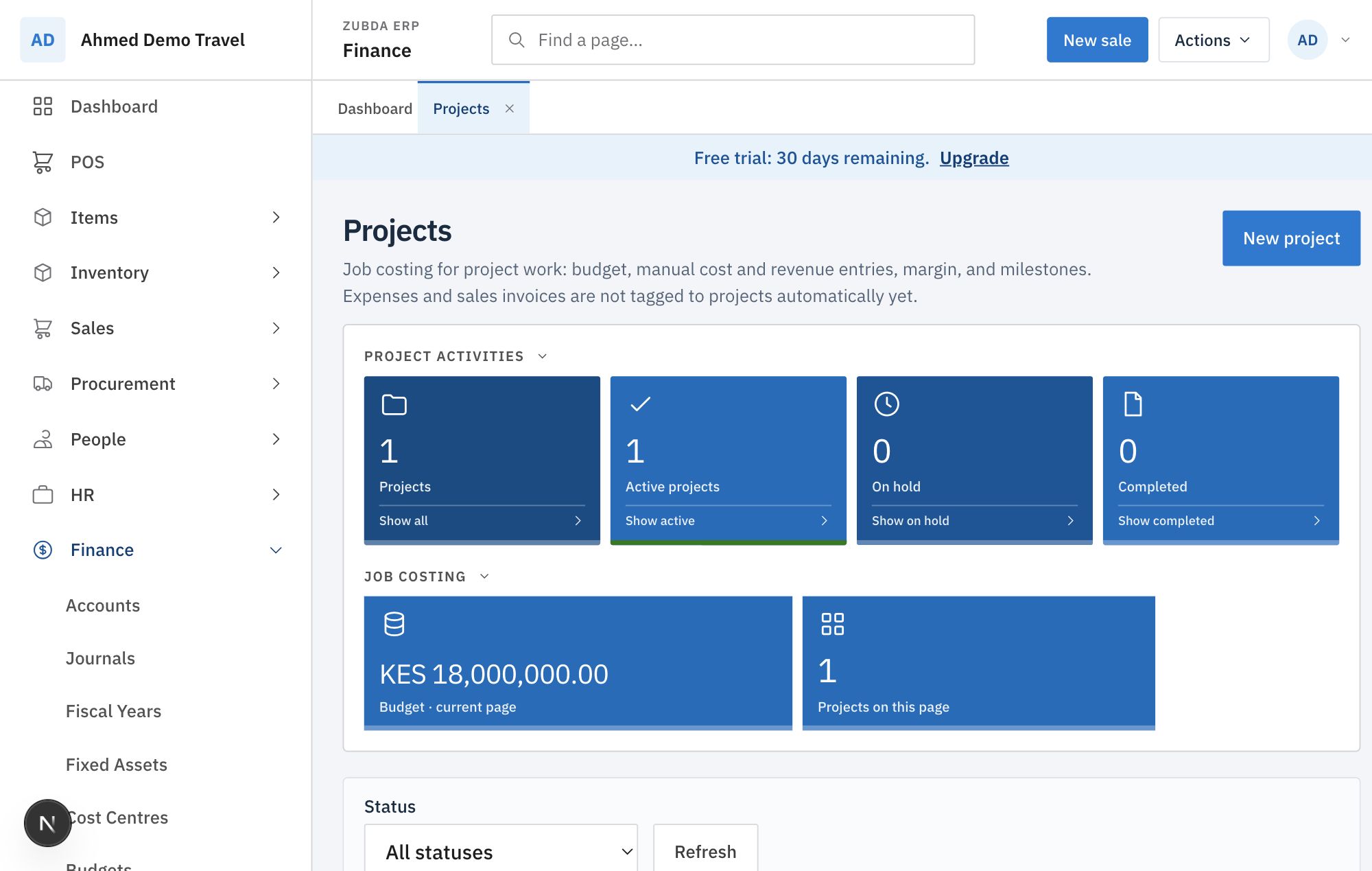
Use the activity tiles to filter active, on-hold and completed work. The budget tile is the sum of the projects on the current page, so use status filters before reading it as a portfolio total.
Tutorial 2
Record cost, revenue and milestones
Open Costing on the project row. Record actual costs as they happen, not only at month-end. The entry form accepts a date, type, category, description, amount and reference.
- Cost entries cover material, labour, subcontract, equipment, travel and other costs.
- Revenue entries record certified work, deposits or milestone billing.
- Milestones hold the billing and delivery schedule, including amount and status.
- Put the LPO, invoice, payment or delivery reference in the reference field.
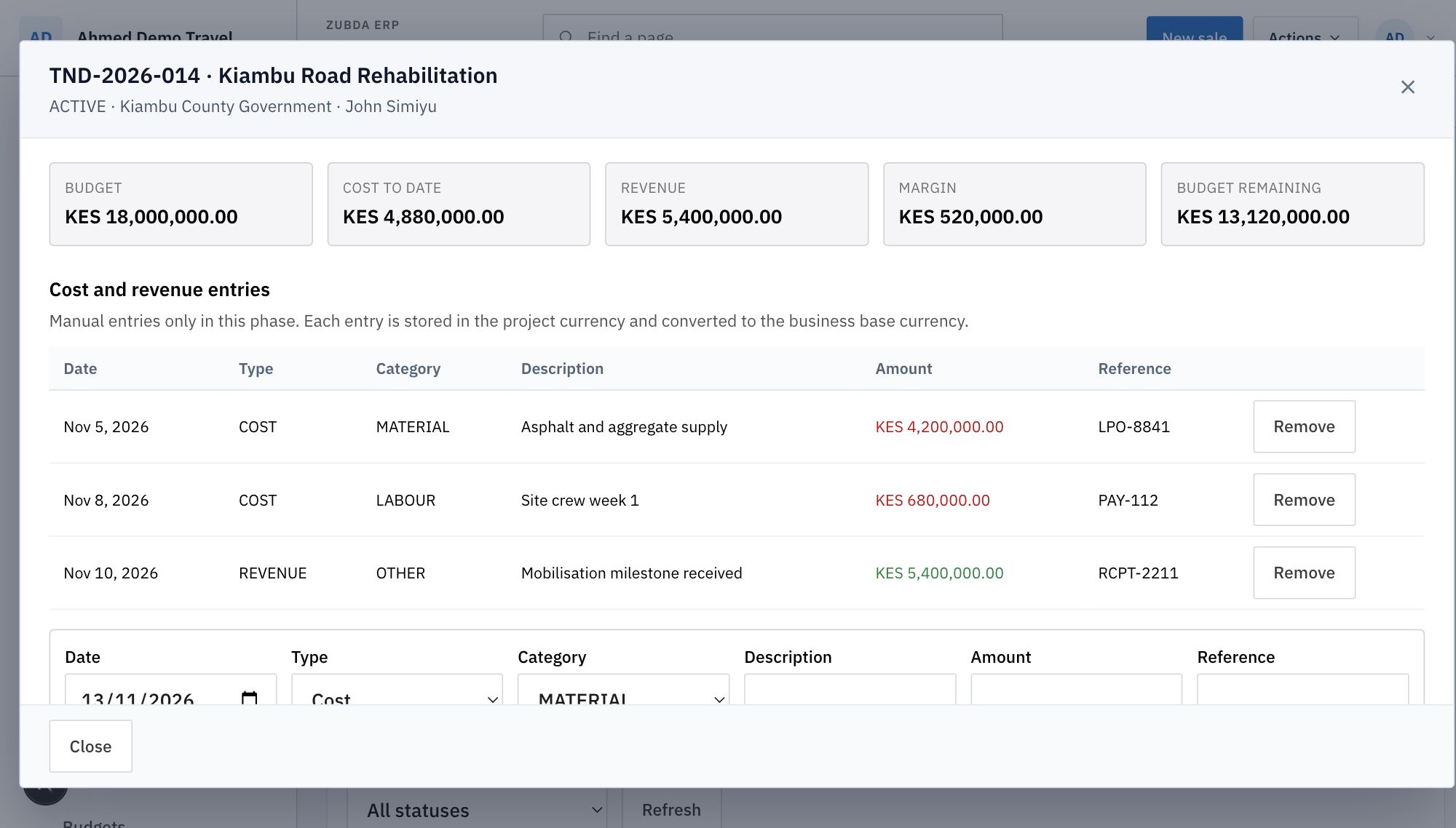
Review the five figures together. A positive margin with a large budget remaining can mean the work is under way; it can also mean costs are not being recorded yet. Reconcile supplier bills, payroll and expenses to the project before treating the margin as final.
Tutorial 3
Create and run a work order
Work orders require a bill of materials (BOM). A BOM defines the finished product, the components and a labour cost. Go to Inventory → Work orders.
- Choose the BOM and the production location.
- Enter the quantity and due date.
- Set priority and add production notes.
- Add operations such as cutting, assembly, inspection or packing, with work centre and planned minutes.
- Save as a draft, then Release it to create the linked assembly plan.
- Start production and update operation progress.
- Complete it to consume components and add finished stock.
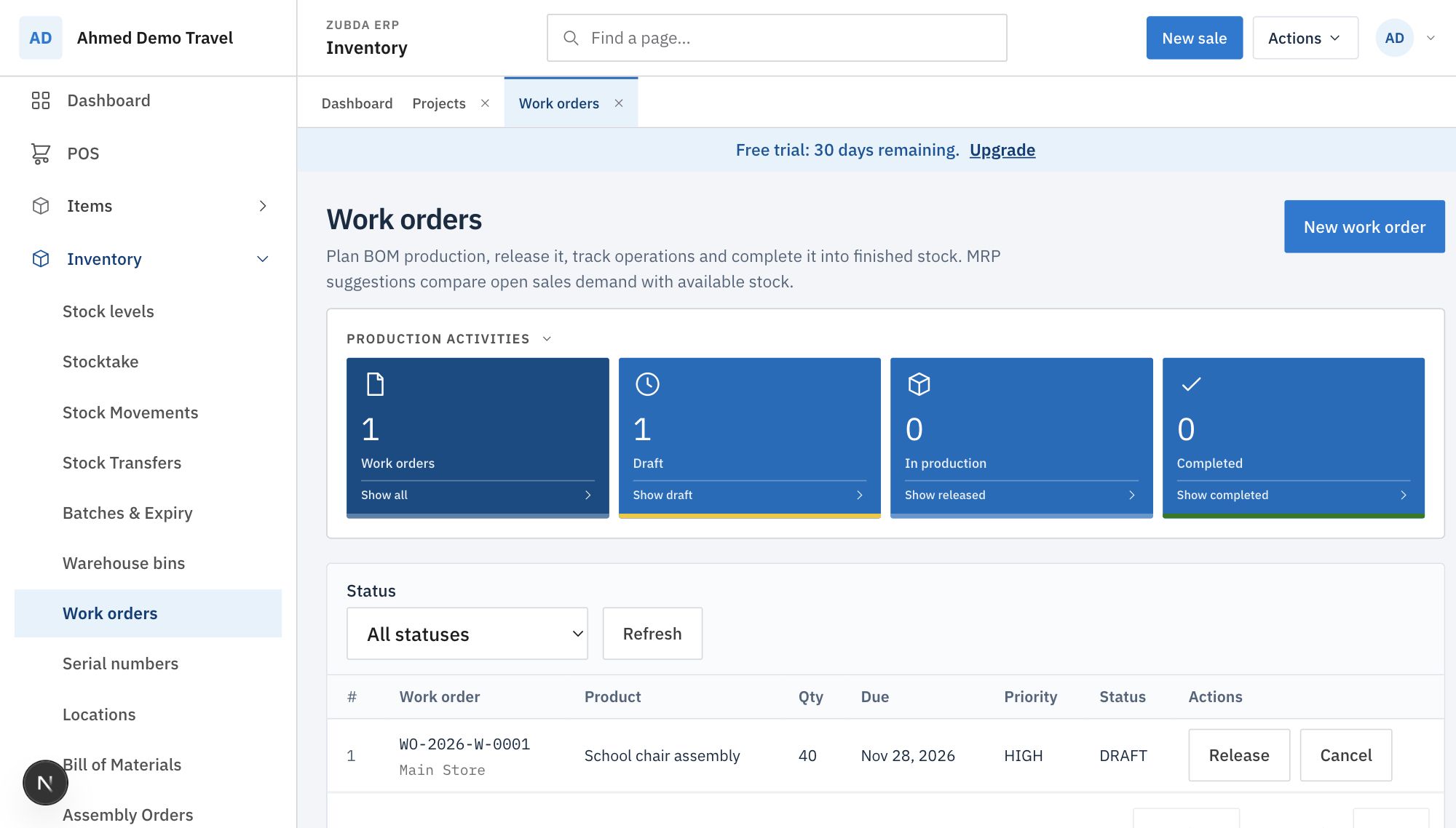
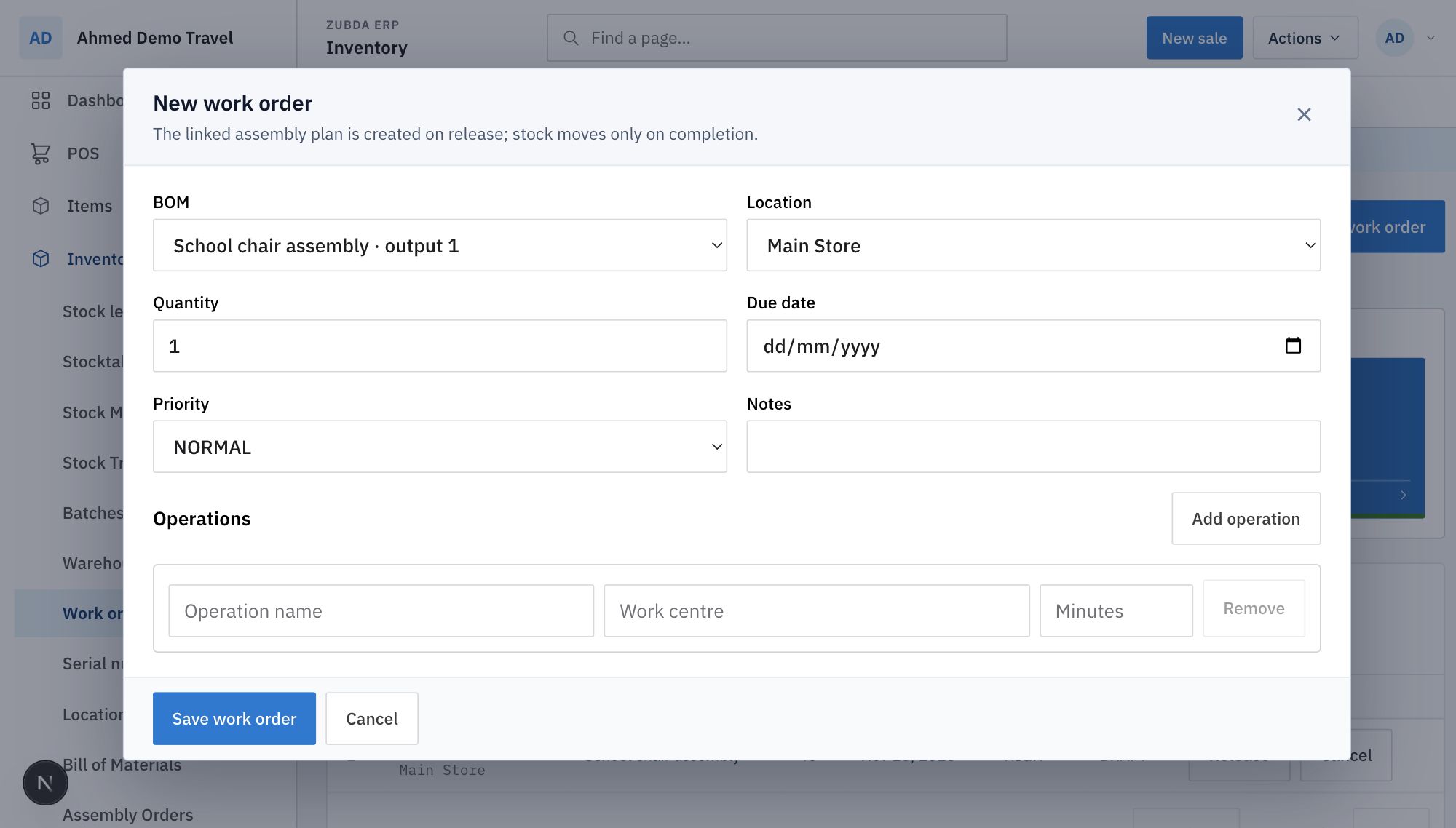
Stock does not move when you create or release a work order. It moves when you complete it. That makes completion a controlled stock event, not a side effect of planning.
Case study
A county tender, from award to margin
This is a worked example using synthetic data. A contractor wins a road rehabilitation tender and wants one place to see the contract value, supplier commitments and billing milestones.
| Tender | TND-2026-014 · Kiambu Road Rehabilitation |
|---|---|
| Customer | County government (worked example) |
| Contract budget | KES 18,000,000 |
| Cost recorded | KES 4,880,000 · materials and labour |
| Revenue recorded | KES 5,400,000 · mobilisation milestone |
| Margin to date | KES 520,000 |
| Budget remaining | KES 13,120,000 |
Tender operating routine
- 1. Award. Create the project from the tender number. Set customer, start/end dates, manager, contract value and currency.
- 2. Plan. Split the bid into cost categories: material, labour, subcontract, equipment, travel and other. Add billing milestones.
- 3. Commit. Record supplier and subcontract commitments as they happen. Tag the purchase order to the project; the commitment is visible but not posted.
- 4. Produce. Raise work orders for any prefabrication, assembly or repair batch. Release, start and complete them into stock.
- 5. Bill. Mark milestones as they are achieved and record revenue against the project.
- 6. Review. Compare cost, revenue, margin and budget remaining before the next phase or variation.
The value of the project record is not the dashboard alone. It is the ability to answer, during the contract, which supplier commitments are still missing and whether the next milestone can be billed without eroding the margin.
Case study
Forty school chairs for a tender batch
A workshop receives an order for 40 school chairs. The finished chair is an assembly. The BOM uses a steel frame, a moulded seat shell and a labour cost. The work order carries the batch quantity, due date and two operations: cut and weld, then assemble and inspect.
Finished product
School chair assembly
Batch
40 chairs
BOM cost
KES 890 per chair
Operations
Cut and weld; assemble and inspect
Due date
28 November 2026
Stock effect
Components consume on completion; finished chairs enter stock
If the tender also has an installation phase, keep the manufacturing batch as a work order and put the site labour, transport and installation budget under the project. That separates factory cost from contract cost without duplicating the stock movement.
Now available
Scheduling and bookings
Bookings are available in the portal under Sales → Bookings. They are separate from projects and work orders: a booking holds date, time, resource capacity, customer, party size, deposit and status.
- Create a resource: staff member, room, vehicle, equipment item or other capacity.
- Set its capacity: one place for a room or vehicle, or the number of concurrent places for a class or consultant.
- Create the booking with service, customer, start, end, party size, total and deposit.
- Confirm the booking; the capacity check rejects overlaps that exceed the resource.
- Complete, cancel or mark no-show when the date arrives.
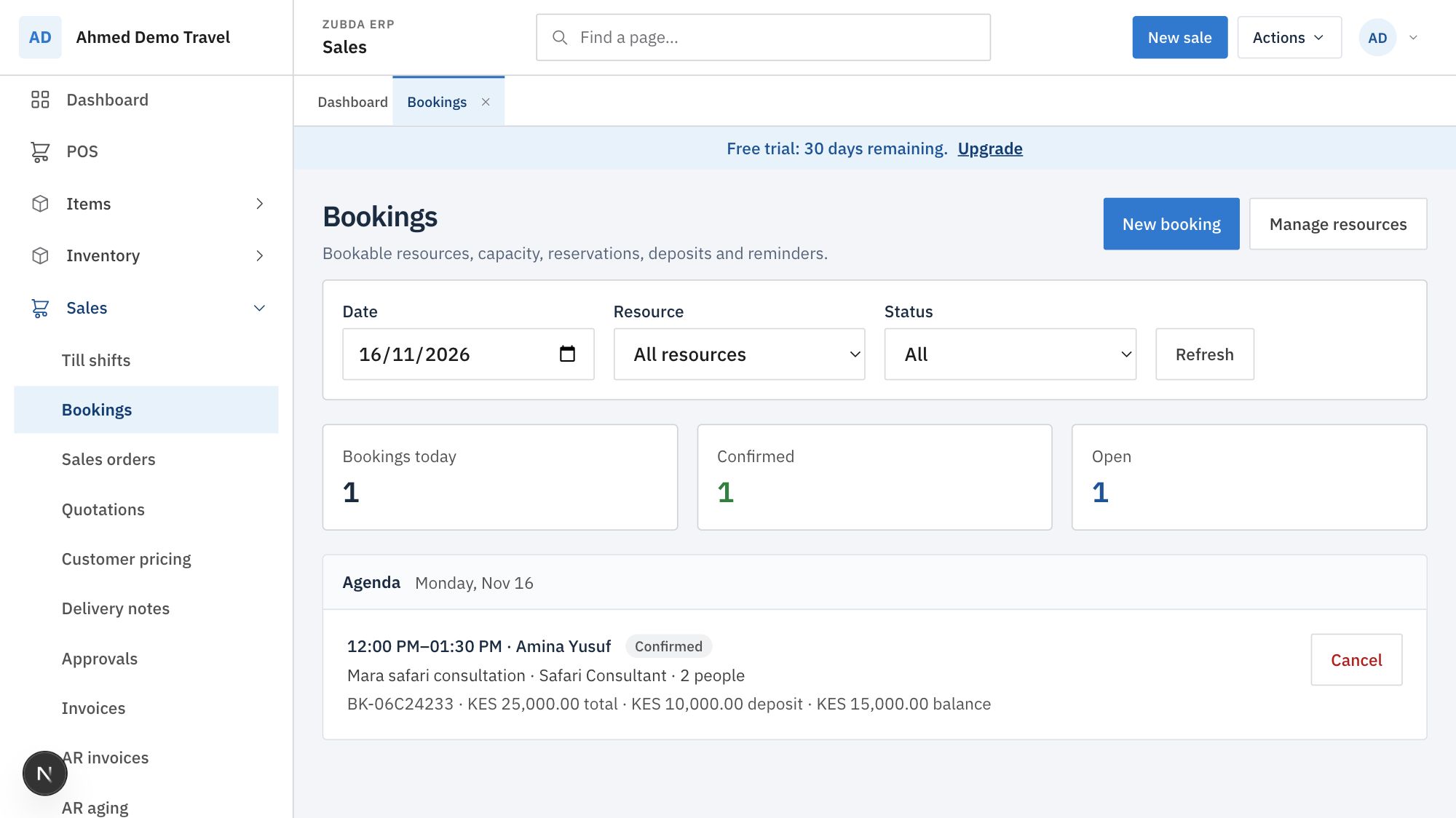
The customer, service and money stay in the same system as sales and projects. A booking does not move stock or post revenue; convert the completed service into an order or invoice when you bill it.
Roadmap
Buy only the modules you need
Today, access follows the subscription plan and operator-granted add-ons. The planned module marketplace separates three ideas that are easy to confuse:
Plan entitlement
What the business has paid for. The server enforces it.
Module activation
What this business wants visible in its menu. A licensed module can be hidden.
Marketplace
Where a business buys an add-on, upgrades a plan or requests an industry pack.
Industry packs would start from a sensible menu, not a blank screen:
| Business | Suggested modules |
|---|---|
| Tailor or garment workshop | POS, products and variants, inventory, quotations, work orders, projects, customers |
| Perfume or cosmetics maker | POS, products, BOM/recipes, batch and expiry, inventory, purchasing, expenses |
| Computer manufacturer | BOM, work orders, serial tracking, inventory, purchasing, sales, warranty, projects |
| Tour operator | Products as services, quotations, expenses, projects, CRM, portals, and the planned bookings module |
| Maintenance contractor | Projects, work orders, inventory, purchasing, expenses, customer portal |
The menu should be generated from the modules the business has both licensed and chosen to show. Turning off POS must not delete sales history or revoke access to reports; it only removes the workspace from the daily menu.
Be precise
Current limits
- Project cost and revenue are tagged automatically from supplier bills, expenses, payroll, sales invoices and work orders. A manual project entry is a commitment or accrual, never a second actual.
- Work orders require a BOM and stock-tracked components; they are not a general task list for service jobs. Use a project for advisory or service-only work.
- Batch and serial tracking use separate receiving and stock workflows. A product is not both under one type.
- Scheduling and bookings are live under Sales → Bookings. A self-serve module marketplace is still planned.
- Projects, work orders and bookings are plan-gated and enforced by the server, not only hidden in the menu.
Need a project or production workflow that does not fit? Talk to Zubda with the documents, batch sizes and approval points your team already uses.